
Have a look at pudhuvai.com. It has lot of useful technology informations.

FastStone Image Viewer is a fast, stable, user-friendly image browser, converter and editor. It has a nice array of features that include image viewing, management, comparison, red-eye removal, emailing, resizing, cropping and color adjustments. Its innovative but intuitive full-screen mode provides quick access to EXIF information, thumbnail browser and major functionalities via hidden toolbars that pop up when your mouse touches the four edges of the screen. Other features include a high quality magnifier and a musical slideshow with 150+ transitional effects, as well as lossless JPEG transitions, drop shadow effects, image annotation, scanner support, histogram and much more. It supports all major graphic formats (BMP, JPEG, JPEG 2000, animated GIF, PNG, PCX, TIFF, WMF, ICO and TGA) and popular digital camera RAW formats (CRW, CR2, NEF, PEF, RAF, MRW, ORF, SRF and DNG).
Internet Explorer Backup
BackRex Internet Explorer Backup is a backup and restore tool for Internet Explorer. It allows you to backup favorites, history, proxy settings, fonts, dialup accounts, autocomplete passwords and cookies.
BackRex Internet Explorer Backup can help you to move all your Internet Explorer settings from one computer to another, even if it has a different version of Windows and/or Internet Explorer installed (for example from Internet Explorer 7.0 to Internet Explorer 8.0 or vice versa).
With Scheduled Backup feature you can backup all your data on a regular basis - daily, weekly or monthly.
What exactly is backed up?
Below is the list of data and settings saved and restored by BackRex Internet Explorer Backup:
Internet Explorer:
Favorites
Proxy & connection settings
Security zones
User customizations
Cookies
History
Dialup accounts
Form Autocomplete entries
Screenshot:

Download Backrex
Core Temp is a compact, no fuss, small footprint program to monitor CPU temperature.
Now Windows Vista and Windows 7 ready! (x86 and x64)
The uniqueness of it is that it shows the temperature of each individual core in each processor in your system! You can see in real time how the CPU temperature varies when you load your CPU. It's also completely motherboard independent.
Intel and AMD recently published detailed, public information about the "DTS" (Digital Thermal Sensor), which provides much higher accuracy and more relevant temperature reading than the standard thermal diode sensors do. This feature is supported on all Intel Core and Core 2 based processors as well as the whole AMD's Athlon64 line of CPUs.
Core Temp also has a logging feature, allowing a user to easily record the temperature of his processor(s) over any period of time, then the data can be easily transferred into an excel datasheet for easy graphing.
Core Temp works on Windows 2000, XP, 2003 and Vista (both 32bit and 64bit versions).
Thanks to CoolIT Systems for providing a digitally signed Core Temp driver which now works on all Vista versions.

Download Core Temp 32 Bit
Download Core Temp 64 Bit
This is the finest technique to send images with good resoultion with less file size through email. If we take pictures from our digital camera the file size is about more than 1 MB atleast. It consumes 50 MB to send 50 images(approx).
Here we go. Open MS Paint in windows (shortcuts: mspaint or pbrush), import that image, just save that image in a different location without making any modifications.
Note: Save the file as JPG, Always use Save As option to keep your existing file safely. This quality is much enough to view.
Here we go. Open MS Paint in windows (shortcuts: mspaint or pbrush), import that image, just save that image in a different location without making any modifications.
Note: Save the file as JPG, Always use Save As option to keep your existing file safely. This quality is much enough to view.
DownThemAll (or just dTa) is a powerful yet easy-to-use Mozilla Firefox extension that adds new advanced download capabilities to your browser.
DownThemAll lets you download all the links or images contained in a webpage and much more: you can refine your downloads by fully customizable criteria to get only what you really want.
DownThemAll is all you can desire from a download manager: it features an advanced accelerator that increases speed up to 400%, it allows you to pause and resume downloads at any time and, last but not least, it's fully integrated into your favorite browser!

MozillaCacheView is a small utility that reads the cache folder of Firefox/Mozilla/Netscape Web browsers, and displays the list of all files currently stored in the cache. For each cache file, the following information is displayed: URL, Content type, File size, Last modified time, Last fetched time, Expiration time, Fetch count, Server name, and more.
You can easily select one or more items from the cache list, and then extract the files to another folder, or copy the URLs list to the clipboard.

Download MozillaCaheView
You can easily select one or more items from the cache list, and then extract the files to another folder, or copy the URLs list to the clipboard.

Download MozillaCaheView
IECacheView is a small utility that reads the cache folder of Internet Explorer, and displays the list of all files currently stored in the cache. For each cache file, the following information is displayed: Filename, Content Type, URL, Last Accessed Time, Last Modified Time, Expiration Time, Number Of Hits, File Size, Folder Name, and full path of the cache filename. You can easily save the cache information into text/html/xml file, or copy the cache table to the clipboard and then paste it to another application, like Excel or OpenOffice Spreadsheet.

Download IECacheView

Download IECacheView
10 years of malware experience combined in one dynamic application. Ad-Aware - Anniversary Edition offers radically improved performance and efficiency, along with comprehensive malware protection. With real-time monitoring, threat alerts, and automatic updates you can rest easy knowing that you are protected.

Download Ad-aware

Download Ad-aware
Orbit Downloader, leader of download manager revolution, is devoted to new generation web (web2.0) downloading, such as video/music/streaming media from Myspace, YouTube, Imeem, Pandora, Rapidshare, support RTMP. And to make general downloading easier and faster.

Download Orbit
Download Orbit
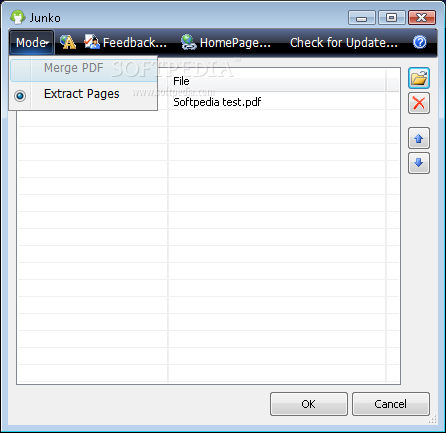
Junko is a good tool possessing desirable qualities in quicker and more efficient access to information needed from your PDF files, reorganizing them in a way that makes them easier to manage and handle.
With the ability to split PDF files into separate documents, either by page range or page numbers, and merge an unlimited number of PDF documents into a single PDF file, you gain control of all your PDF files.
Enhancements: Has added support to PDFCreator allowing the transparent conversion of additional file types to PDF.

Download Junko
With the ability to split PDF files into separate documents, either by page range or page numbers, and merge an unlimited number of PDF documents into a single PDF file, you gain control of all your PDF files.
Enhancements: Has added support to PDFCreator allowing the transparent conversion of additional file types to PDF.
Download Junko
EncodeHD is a an application to re-encode all types of video files for use on your home media player or on-the-go device. It aims to provide a simple interface with no fuss, and give you the best speed possible without compromising on quality. The following output device types are supported:
* Apple TV
* BlackBerry (8100) Pearl
* BlackBerry (8200) Kickstart
* BlackBerry (8300) Curve
* BlackBerry (8700) Electron
* BlackBerry (8800) Indigo
* BlackBerry (8900) Javelin
* BlackBerry (9000) Bold
* BlackBerry (9500) Storm
* iPhone
* iPod 5G
* iPod Classic
* iPod Nano
* iPod Touch
* Nokia E71
* Playstation 3
* PSP
* T-Mobile G1
* Western Digital TV
* X-Box 360
* Youtube HD
* Zune

Download EncodeHD
iRinger creates free ringtones for your iPhone (and iPhone 3G, 3GS) from
virtually any music or video file you own. Even YouTube videos!
iRinger exports ringtones to iTunes, so there is no need to "jailbreak"
your iPhone. You will be creating ringtones in seconds. It's that simple.

Download i-ringer
virtually any music or video file you own. Even YouTube videos!
iRinger exports ringtones to iTunes, so there is no need to "jailbreak"
your iPhone. You will be creating ringtones in seconds. It's that simple.

Download i-ringer
Air show of French Army 2009
Hi Friends i would like to share my recorded clip with you all
BitDefender Rescue Disk , a bootable anti virus scanner that scan your computer for any virus. The functionality of BitDefender Rescue Disk is similar like Kaspersky Rescue Disk which performs anti virus scanning and other before loading the operating system. Meanwhile, BitDefender Rescue Disk has ability to automatically update its virus definition which makes it more advance than other rescue disk CD utility.
The update Anti Virus definition will be automatically trigger once the BitDefender rescue disk detected internet connection while boot up. Plus more, BitDefender security technology consists highly sensitive in detecting both known and unknown virus.
Meanwhile, this free BitDefender Rescue CD also bundles a lot of useful third party utilities such as ChkRootkit for scanning for rootkis, Nessus Network Scanner as remote network security scanner, Mozilla Firefox, Partition Image, GtkRecover and etc to improve productivity of rescue disk.

How to Use:
Download a Bitdefender Rescue Disk from Here.
Use any Burning Software Tool to write this ISO image into cd.
Insert the cd into cd/dvd rom then setup the bios option as "First Boot Priority" to CD/DVD.
Then start the Computer and follow the screen instructions.
If you did any miss configuration in firefox settings and preferences you may encountered some errors on connection,slowdown etc.. to correct this problem you don't need reinstall firefox because your reinstallation will not correct such problems.In my case i miss configured my firefox in proxy mode the result my browser won't connect to the net.In this situation i did a factory default restoration to remedy from this error. before do that i advise you to backup your bookmars.
Then watch Here:
Then watch Here:
This artical show you how to convert your youtube downloaded albums into MP3 otherwise simply says how to convert youtube videos into MP3.
First you have to download a freeware called Vdownloader. You can get this tool from here.
Watch Here:
First you have to download a freeware called Vdownloader. You can get this tool from here.
Watch Here:
Subscribe to:
Posts (Atom)